 1300 223 668
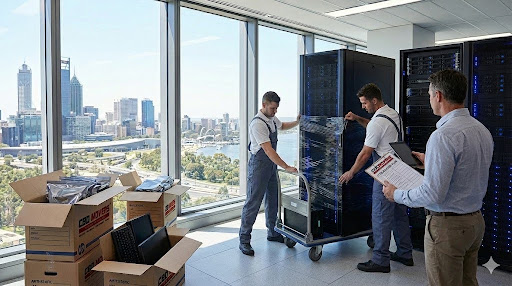
Relocating an office is never just about desks and chairs. Technology is now the backbone of almost every business. Servers, computers, networking devices and storage systems all need special care. This extended IT relocation checklist is designed to help Perth offices move their IT assets safely, with minimal downtime and fewer risks.
Whether you are a small business shifting suburbs or a growing company upgrading to a larger office, a structured approach makes all the difference. With clear steps, simple language and practical tips, this guide keeps your move organised from planning through to post-move testing.
Why IT Relocation Needs Special Planning
IT equipment is expensive, sensitive and critical to daily operations. A single mistake can cause data loss or long delays. Unlike furniture, servers and computers cannot be rushed or handled roughly. They also rely on correct power, cooling and network setups at the new location.
Using a proven IT relocation checklist in Perth helps you:
- Reduce business downtime – Proper planning keeps systems offline for the shortest time possible. Many businesses aim for weekend moves to avoid disrupting weekday operations.
- Protect valuable data and hardware – Servers contain irreplaceable business data. Physical damage during transport can mean permanent data loss if backups are inadequate.
- Keep staff productive after the move – When IT systems come back online quickly, employees can resume work without long delays. This maintains morale and business continuity.
- Avoid costly repairs or replacements – IT equipment is expensive. A damaged server or broken network switch can cost thousands to replace. Prevention is always cheaper than repair.
Professional removalists in Perth, such as CBD Movers, play an important role by handling transport safely while your IT team focuses on systems and data. Their experience with office relocations means they understand the special requirements of technology equipment.
Understanding Your IT Assets Before the Move
Prepare a detailed list of every piece of technology equipment in your office. This inventory should include:
- Servers and racks – Document server models, serial numbers and rack positions. Note which servers are physical and which are virtual hosts. Understanding your server infrastructure is crucial for your server relocation plan Perth.
- Desktop and laptop computers – List all workstations, noting which departments they belong to. Include asset tags or serial numbers for tracking purposes. Don’t forget spare or backup computers stored in cupboards.
- Monitors and peripherals – Count monitors, keyboards, mice, webcams and other accessories. These items seem minor but add up quickly. Damaged monitors are expensive to replace and delay employee setup.
- Network devices such as switches and routers – Network infrastructure keeps everything connected. Document switch models, port configurations and how devices connect. Take photos of network cabinet setups before disconnecting anything.
- Backup drives and storage units – External hard drives, NAS devices and backup systems all need careful handling. These devices often contain your only copies of critical data.
- Printers and scanners – Multi-function devices, label printers and specialist scanners all need documenting. Note their network addresses and settings for easier reconnection.
- Phone systems – Modern VoIP phones and traditional phone systems both require planning. Document extensions, handset assignments and system configurations.
This comprehensive inventory supports your server relocation plan in Perth and ensures nothing is misplaced during transit. Keep this inventory digital and share it with your moving team and IT staff.
Planning Your IT Relocation Timeline
Ideally, start planning at least four weeks before moving day. Complex environments with multiple servers might need two- or three-months preparation. This planning time allows for:
- Equipment audits – Walk through your entire office documenting every piece of IT equipment. Update your asset register. Identify equipment that’s obsolete and can be disposed of rather than moved.
- Data backups – Full system backups take time, especially for large file servers or database systems. Plan multiple backups runs to ensure data integrity.
- Packing and labelling – Proper packing cannot be rushed. Each item needs appropriate protection and clear labelling. Allow several days for this task, especially in larger offices.
- Communication with staff – Employees need advance notice about the move. They need to back up personal files, understand what they’re responsible for packing and know when systems will be unavailable.
- Testing at the new location – Before moving any equipment, visit the new office to verify power outlets, network points and cooling systems are ready. Problems discovered on moving day cause expensive delays.
A clear schedule strengthens your data centre migration in Perth strategy, even if you are moving a small server room. Document your timeline and share it with everyone involved in the move.
Packing IT Equipment Safely
IT equipment is fragile and expensive. Proper packing prevents damage that could cost thousands in repairs or replacements.
Use the Right Packing Materials
IT equipment needs more than standard boxes and packing. Standard cardboard boxes don’t provide adequate protection for sensitive electronics. Use specialised packing materials:
- Anti-static packaging for electronic parts – Static electricity damages circuit boards and electronic components. Use anti-static bags for network cards, hard drives and other loose components.
- Heavy-duty boxes for monitors and servers – Standard boxes collapse under the weight of servers and large monitors. Double-walled boxes provide better protection.
- Foam or padded inserts to prevent movement – Items shouldn’t shift inside boxes during transport. Custom foam inserts or padding keep equipment secure.
- Cable management supplies – Cable ties, labels and bags keep cables organised and prevent tangling during the move.
Professional packing services from CBD Movers can help protect delicate items. Their experience with office relocations means they understand how to pack safely.
Label Everything Clearly
Clear labelling saves hours during reinstallation. Without proper labels, you’ll waste time figuring out which cable goes where and which box contains critical equipment. Include on every label:
- Device name – Use the same names from your inventory. Consistency prevents confusion.
- Destination room – Write clearly which room or area the equipment belongs in. Use room numbers or department names.
- Rack or desk position – For equipment that goes in server racks or specific desk locations, note exactly where it should be reinstalled.
- Priority level – Mark critical systems that need reconnecting first with clear “Priority 1” labels.
- Fragile warnings – Mark boxes containing delicate equipment with large “FRAGILE” stickers on all sides.
This simple step makes moving computer equipment far more efficient. Your IT team and movers can work faster when everything is clearly identified.
Work With Experienced Removalists
Professional movers understand how to handle heavy and sensitive equipment. CBD Movers provide trained teams who manage lifting, loading and transport safely. Their experience with office relocations means they understand the requirements of IT equipment.
Internal resources that support planning include:
- Office relocation services – Comprehensive moving solutions for entire offices including IT equipment
- Packing and unpacking assistance – Professional packing ensures everything is protected during transport
- Labour hire for large offices – Extra hands for loading, unloading and setup tasks
- Secure storage solutions – Temporary storage if your new office isn’t ready or you’re downsizing
These services reduce risk and speed up the relocation process significantly. Professional movers also carry insurance covering equipment damage during transport.
Transporting Servers and Network Equipment
Servers are the most sensitive items in any office move. They contain your business data and are vulnerable to physical damage during transport.
- Powering down systems correctly – Never just pull the plug on servers. Shut down operating systems properly to prevent file system corruption. Allow systems to complete their shutdown processes fully.
- Removing loose components – Take out hard drives, expansion cards and other components that might shake loose during transport. Pack these separately with clear labelling.
- Securing rack-mounted equipment – If servers stay in racks, secure them with additional straps. Empty rack units can collapse during transport. If possible, remove servers from racks and pack them individually.
- Using shock-resistant packing – Servers need extra padding. Hard drives are particularly vulnerable to shock and vibration. Use foam inserts and pack servers in strong boxes.
- Maintaining temperature control – Servers should be kept at moderate temperatures. Extreme heat or cold during transport can damage components.
This approach supports safe data centre migration Perth, even for smaller setups. Taking time to prepare servers properly prevents expensive damage and data loss.
Example IT Relocation Timeline
| Phase | Key Activities | Suggested Timing |
| Planning | Inventory, scheduling, risk checks | 30 days before |
| Backup | Full data backup and testing | 7 days before |
| Packing | Label and pack equipment | 2–3 days before |
| Move day | Transport and unloading | Day of move |
| Setup | Reconnect and test systems | 1–2 days after |
This table provides a simple structure to follow during your move. Adjust timings based on your office size and complexity.
Setting Up at the New Office
Arrival at your new office is just the beginning. Proper setup ensures your business resumes operations quickly.
- Servers – Set up servers first since other systems depend on them. Verify power connections, network cables and all components before powering up.
- Network switches – Once servers are ready, connect network infrastructure. Verify switch configurations haven’t changed during the move.
- Internet connections – Confirm internet connectivity works before connecting workstations. Test speeds and verify firewall settings.
- Wireless access points – Deploy WiFi access points and confirm coverage throughout the office.
Once these core systems are stable, reconnect workstations and peripherals. This staged approach prevents overwhelming your network with simultaneous connections.
Compliance and External Guidance
Official guidance can help improve safety and compliance during IT relocation. Following established standards protects your business:
- Australian Cyber Security Centre advice on ICT equipment protection – The Australian Cyber Security Centre provides guidance on protecting IT equipment during transport and ensuring data security.
- Australian Government ICT planning guidance – The Digital Transformation Agency offers resources for planning technology relocations in compliance with government standards.
- University IT relocation procedures – Many Australian universities publish their IT relocation procedures, providing tested frameworks you can adapt. Check resources from institutions like the University of Melbourne.
These references add credibility and help refine your checklist. They also demonstrate due diligence if you need to explain your relocation process to auditors or compliance officers.
Common IT Relocation Mistakes to Avoid
Learning from others’ mistakes saves time and money. Avoid these common moving mistakes:
- Skipping data backups – Some businesses assume their data is safe and skip comprehensive backups. This gamble can result in catastrophic data loss if equipment is damaged.
- Poor labelling of equipment – Inadequate labels cause confusion and delays. Invest time in clear, consistent labelling before the move.
- Rushing setup without testing – Pressure to resume operations quickly leads to incomplete testing. Problems discovered later cause more disruption than thorough initial testing.
- Not using professional movers – Attempting to save money by using inexperienced movers often costs more in damaged equipment and extended downtime.
- Forgetting about insurance – Ensure your equipment is insured during the move. Professional movers provide insurance, but verify coverage levels are adequate.
- Ignoring environmental requirements – Server rooms need specific temperature and humidity levels. Verify your new location meets these requirements before moving equipment.
Each mistake can increase downtime and costs significantly. Following this IT relocation checklist Perth helps you avoid these common problems.
Coordinating IT Moves with Interstate Relocations
Some Perth businesses relocate technology across state borders as part of expansion or consolidation. In these cases, experienced interstate movers play a critical role alongside IT teams. Professional interstate removalists manage secure packing, controlled transport, and compliant handling of sensitive equipment, supporting interstate office relocations and interstate furniture transport without unnecessary downtime. Working with trusted long distance movers ensures IT assets arrive safely and are ready for prompt reinstallation.
Final Checklist Summary
Before the move:
- Complete comprehensive inventory and backups
- Verify backup integrity with test restores
- Confirm schedules and roles with all teams
- Pack and label everything clearly
- Test critical systems one final time
During the move:
- Supervise equipment handling personally
- Communicate regularly with movers and IT staff
- Keep backup drives and critical data with you
- Document any damage immediately
- Maintain contact with both office locations
After the move:
- Test all systems methodically before staff return
- Monitor performance closely
- Resolve issues quickly to prevent bigger problems
- Update all documentation
- Gather feedback from staff and stakeholders
If you need professional support, CBD Movers offer reliable office relocation services across Perth, helping move safely and efficiently. Their experienced teams understand the requirements of IT equipment and work carefully to protect your valuable technology assets.