 1300 223 668
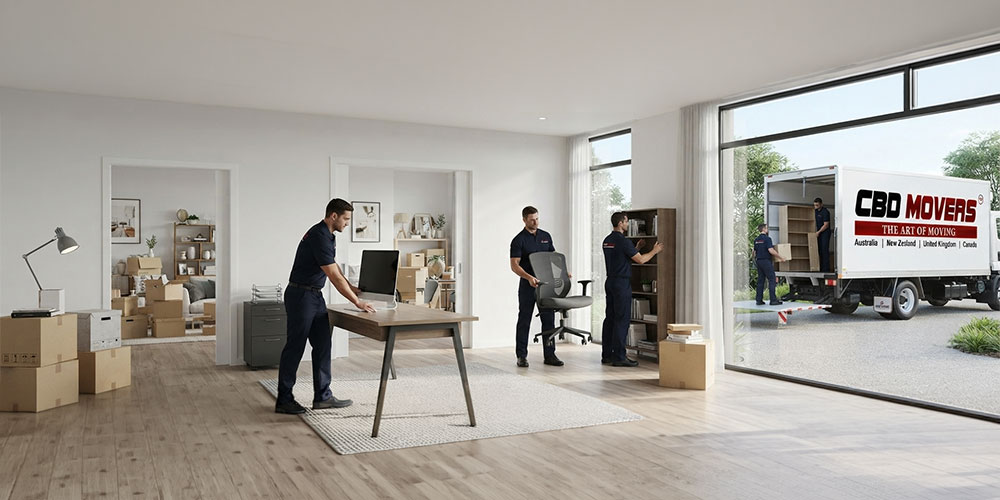
Relocating to a new property is an exciting milestone, especially for remote professionals, freelancers, and business owners who operate from home. However, stepping into a new residence surrounded by unopened boxes can quickly feel overwhelming when client deadlines or work schedules are looming. Setting up a dedicated, highly functional work zone is one of the very first tasks you need to complete to maintain professional productivity.
Executing a systematic home office setup after moving ensures you establish a comfortable, quiet, and ergonomically sound environment right away. At CBD Movers, our teams assist individuals and families across Australia with seamless household and commercial relocations. Whether you are transitioning locally or across state borders, following a structured plan helps you avoid downtime and settle into your new workspace quickly.
The Essential Moving Checklist for Setting Up Your Workspace
When preparing for your relocation, starting with a comprehensive moving checklist is the most effective way to coordinate your workspace transition. Breaking down tasks into distinct phases prevents last-minute panic and keeps high-value electronic equipment secure.
Phase 1: Pre-Move Office Preparation List
- Audit and Declutter Work Equipment: Review your current office space. Shred outdated client paperwork, donate surplus office supplies, and recycle non-functional cables or old computer peripherals.
- Review Your Moving Preparation List: Document serial numbers of expensive laptops, tablets, and desktop workstations for insurance and asset-tracking records.
- Back Up Essential Business Data: Perform full cloud and offline external drive backups of all primary work computers before packing them into transport boxes.
- Photograph Cable Configurations: Take clear photographs of the rear connections on your monitor arms, docking stations, and audio equipment to ensure quick reassembly at your new address.
- Schedule Broadband Transfer Early: Contact your internet service provider at least two to three weeks prior to your moving date to book an active NBN connection for your scheduled move-in day.
Phase 2: Packing Your Home Office Essentials
- Pack an Open-First Office Survival Kit: Prepare a personal container with your laptop, charging bricks, work phone, daily notebook, wireless mouse, and vital identity documents. Keep this kit with you in your private vehicle rather than loading it inside the moving truck.
- Protect Computer Monitors and Hardware: Use original manufacturer boxes with fitted polystyrene inserts whenever available. If original packaging is unavailable, wrap screens in anti-static bubble wrap and heavy-duty moving blankets.
- Bag and Label Furniture Hardware: Disassemble bulky desk frames and place all screws, Allen keys, and bolts into clear zip-lock bags. Tape the bag securely to the underside of the matching desk component.
- Organise Office Documents: Place tax records, employment contracts, and sensitive personal documents in lockable filing containers.
Phase 3: Moving Day Office Setup Order
- Direct Removalists to Your Designated Office Space: Have your house removalists unload the office desk, ergonomic chair, and storage cabinets into your chosen study room first before filling hallways with standard household boxes.
- Assemble Primary Furniture Before Opening Accessory Boxes: Construct your desk frame and position your filing cabinets before opening cartons filled with stationery and desktop accessories.
- Establish Internet and Power Connections: Verify that wall power sockets and broadband modems function properly before running monitor cables.
Selecting and Designing Your Dedicated Work Zone
Choosing the right room within your new floor plan sets the foundation for daily focus and physical comfort.
Dedicated Room vs. Multi-Purpose Space
- A Dedicated Home Office: A standalone study or spare bedroom with a closable door offers superior acoustic isolation for confidential telephone calls and video conferences. It also creates a psychological boundary between professional responsibilities and domestic life.
- A Multi-Functional Living Zone: If your new floor plan requires a workspace in a bedroom or dining alcove, define the boundary using room dividers, tall bookshelves, or dedicated indoor plants to maintain visual separation.
Managing Natural Light and Minimising Glare
- Desk Positioning Relative to Windows: Avoid positioning computer monitors directly in front of bright windows or placing your back to an unshaded window, as both layouts cause eye strain and severe screen glare.
- Perpendicular Light Orientation: Position your desk perpendicular to natural light sources. Use sheer curtains or adjustable venetian blinds to regulate daylight throughout changing afternoon angles.
Workstation Ergonomics and Physical Health
According to workplace safety standards published by Safe Work Australia, setting up an ergonomically sound home workstation is vital for preventing musculoskeletal disorders, chronic neck strain, and physical fatigue.
Furthermore, official employment statistics from the Australian Bureau of Statistics show that more than 36% of employed Australians regularly work from home, making home office safety an important health consideration.
Ergonomic Chair and Posture Alignment
- Seat Height Adjustment: Adjust your seat height until your feet rest flat on the floor and your knees align at approximately a 90-degree angle.
- Lumbar Support: Position the chair backrest so the lumbar cushion firmly supports the natural inward curvature of your lower spine.
- Armrest Placement: Adjust armrests so your shoulders remain relaxed and your forearms rest parallel to the desk surface.
Monitor and Screen Placement
- Horizontal Eye Level: Position the top third of your computer display at horizontal eye level. This prevents you from tilting your head downward or upward for extended periods.
- Viewing Distance: Keep monitors approximately an arm’s length (50 to 70 centimetres) away from your seated position.
- Dual Screen Setup: If using two monitors equally, angle them in a gentle semi-circle to reduce repetitive neck rotation.
Sit-to-Stand Desks and Movement
- Varying Posture Throughout the Day: If you utilise an adjustable height desk, alternate between sitting and standing every 45 to 60 minutes.
- Cable Length Considerations: Ensure monitor and power cables have sufficient slack to extend to full standing height without pulling on wall sockets.
Technology Infrastructure, Connectivity, and Cable Management
A seamless home office setup after moving depends on stable digital infrastructure and organised wiring.
Optimising Home Broadband and Wi-Fi
- Wired Ethernet Connections: For uninterrupted video calls and large data uploads, connect your docking station directly to your NBN router using a Cat6 Ethernet cable.
- Wi-Fi Mesh Systems: If your home office is situated far from the main broadband modem, install a Wi-Fi mesh node to eliminate dead spots and maintain high speeds.
Professional Cable Management Steps
- Mount Under-Desk Cable Trays: Attach a metal or mesh tray beneath your desktop to keep power strips and bulky adapters off the floor.
- Use Reusable Hook-and-Loop Ties: Group monitor, power, and peripheral cables together using reusable fabric ties rather than single-use plastic zip ties.
- Label Power Adapters: Tag both ends of power cables with adhesive labels so you can identify specific equipment instantly without tracing cords beneath furniture.
If you are shifting large corporate assets across coastal regions, explore our guide on bulky furniture removal in Broadbeach for expert advice on heavy load logistics.
Moving Out of Home for the First Time: Complete Household Essentials
If your move represents the first time you are establishing an independent household and remote workspace, following a structured moving out of home checklist makes the transition smooth.
Kitchen and Dining Essentials
- Basic cookware set including frying pan, medium saucepan, and baking tray.
- Chef knife, paring knife, cutting board, and wooden cooking spoons.
- Dinner plates, side bowls, mugs, drinking glasses, and cutlery set.
- Electric kettle, toaster, microwave, and refrigerator.
- Multi-purpose cleaning spray, dishwashing liquid, sponges, and tea towels.
Bedroom and Sleeping Essentials
- Quality mattress, protective cover, and supportive bed frame.
- Two sets of fitted sheets, pillowcases, and breathable quilt.
- Bedside lamp and clothes hangers for wardrobe storage.
- Blackout curtains to promote deep, uninterrupted sleep.
Bathroom and Laundry Essentials
- Bath sheets, hand towels, and non-slip bath mats.
- Hand soap, body wash, shampoo, and toilet paper.
- Laundry basket, washing detergent, drying rack, and iron.
- Basic first-aid kit containing pain relief, antiseptic cream, and band-aids.
General Maintenance and Tool Kit
- Cordless drill, manual screwdrivers, adjustable wrench, and claw hammer.
- Tape measure, spirit level, and utility knife.
- Torch, spare batteries, and heavy-duty extension leads.
- Step stool for reaching high cupboards and ceiling light fixtures.
The Master Moving House Checklist for Every Stage
Use this itemised guide to keep track of every operational step across your move:
4 to 6 Weeks Before Relocation
- Confirm tenancy agreements or complete property settlement.
- Request detailed moving estimates from CBD Movers.
- Begin working through your relocation checklist by clearing out garages and spare rooms.
- Book professional end-of-lease cleaners if vacating a rental property.
2 Weeks Before Relocation
- Notify utility retailers (electricity, gas, water, and internet) of your transfer dates.
- Submit address updates to your employer, bank, superannuation fund, and insurance providers.
- Update your records via myGov for the Australian Taxation Office and Medicare.
- Review your state-specific moving checklist in QLD or moving checklist in NSW for local transport guidelines.
Move Day Protocols
- Carry out a final property inspection of your previous residence.
- Verify that all taps are turned off and windows are securely locked.
- Direct removalists regarding heavy furniture placement in your new study and living spaces.
- Test all power points, lights, and hot water taps in your new home.
Post-Move Settlement Phase
- Update your driver’s licence and motor vehicle registration with state transport authorities within 14 days.
- Locate the main water isolation valve and electrical safety switch box.
- Flatten and stack empty cardboard moving boxes for recycling or collection.
- Introduce yourself to your immediate street neighbours.
Navigating Heavy Furniture and Commercial Relocation Needs
Transferring heavy office furniture requires specialised handling to protect your property and prevent personal injury. At CBD Movers, our professional crew provides expert furniture removals services across the country. We use heavy-duty moving blankets, padded dollies, and secure straps to navigate heavy solid timber desks, meeting tables, and executive storage credenzas safely through tight doorways.
For comprehensive commercial shifts, our specialised office relocation solutions and our dedicated office movers business relocation guide deliver structured planning to minimise corporate downtime.
Notice Regarding Office Relocations: Commercial removal services cover standard office furniture such as desks, office chairs, conference tables, and filing cabinets. Removalists do not undertake any IT-related dismantling or disconnection work, including computers, servers, network systems, or wiring. All electronic equipment must be properly disconnected and prepared prior to the scheduled move.
Tips for Setting Up a Home Office That Boosts Productivity
Once your furniture is assembled and your computer is online, refine your space to support daily focus:
- Acoustic Management: Lay an area rug over timber or tile floors and hang lined curtains to absorb audio echo during video calls.
- Vertical Storage Solutions: Install floating wall shelves or modular book units to keep reference manuals and stationery off your main desktop.
- Establish Clear End-of-Day Boundaries: Power down your workstation and step away from your home office at the end of your workday to preserve personal rest time.
How CBD Movers Supports Your Home and Office Relocation
Completing your home office setup after moving allows you to settle into your new home while preserving your professional momentum. At CBD Movers, our experienced removalists provide reliable local and interstate moving services designed to take the physical strain off your shoulders.
By preparing early with structured moving checklists, applying ergonomic principles, and relying on experienced removalist support, you can build a productive, comfortable workspace from day one. From full packing and loading assistance to delicate furniture handling, our team works to ensure your move day runs efficiently.
For dependable moving and furniture transport support across Australia, get in touch with the friendly team at CBD Movers today.
Frequently Asked Questions
The most important step is establishing stable internet connectivity and building your primary desk and ergonomic chair before unpacking smaller household items. Having an operational workstation allows you to handle urgent work tasks without delay.
Pack electronic displays in their original boxes with fitted foam inserts whenever possible. If original packaging is unavailable, wrap screens securely in heavy-duty moving blankets and anti-static padding, transporting them in a temperature-controlled vehicle.
You should contact your internet service provider at least two to three weeks prior to your moving date. Booking early ensures technicians can activate broadband services on or before your move-in day.
Yes, removalists can assist with the physical loading, transit, and placement of heavy timber desks and office furniture. Note that all computers, monitors, and electrical cables must be disconnected and packed prior to removalist arrival.
Relocation costs depend on several variables, including total cargo volume, transit distance, access conditions (such as flights of stairs, elevators, or long walking distances), and any optional packing services requested. All quotes provided by CBD Movers serve as indicative estimations based on these project parameters.